> For the complete documentation index, see [llms.txt](https://cogneed.gitbook.io/cogneed-centre-daide/llms.txt). Markdown versions of documentation pages are available by appending `.md` to page URLs; this page is available as [Markdown](https://cogneed.gitbook.io/cogneed-centre-daide/cogneed-help-center/dashboard/reports/decision-trees-statistics.md).

# Decision trees statistics

This section allows you to view and track the statistics of the decision trees used by your users.

1. In the left menu, filter your data by:
   * Projects/Teams.
   * Date.\ <br>

     <figure><img src="https://160715368-files.gitbook.io/~/files/v0/b/gitbook-x-prod.appspot.com/o/spaces%2FRFCbypPSQCx2ezWjFUPY%2Fuploads%2FpE6MMAOeGI0yozpiovth%2Fimage.png?alt=media&#x26;token=f1821d8d-2cf5-4b19-bcae-334612fe8fdb" alt="" width="213"><figcaption></figcaption></figure>
2. Find your teams' session data: for each data item displayed, a ℹ️ is displayed if you would like more information.

## Trends

At the top of this section, you will first find the total number of decision trees launched and the ones resolved in the selected period, by project or by team.

<figure><img src="https://160715368-files.gitbook.io/~/files/v0/b/gitbook-x-prod.appspot.com/o/spaces%2FRFCbypPSQCx2ezWjFUPY%2Fuploads%2F0phkrqv9GoFuzaswap1j%2Fimage.png?alt=media&#x26;token=0b937528-c35b-474d-8e88-8cb8ff8e2535" alt=""><figcaption></figcaption></figure>

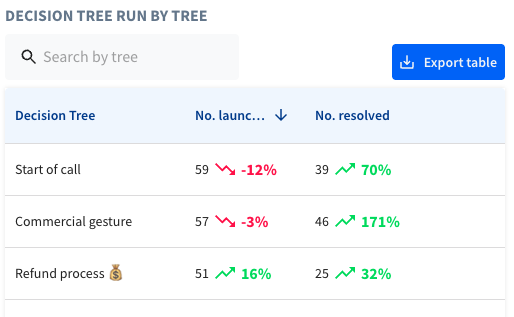
## Statistics by tree

<figure><img src="https://160715368-files.gitbook.io/~/files/v0/b/gitbook-x-prod.appspot.com/o/spaces%2FRFCbypPSQCx2ezWjFUPY%2Fuploads%2Fzh8X2sWkmlXOI78vlEWw%2Fimage.png?alt=media&#x26;token=12ed9f6d-31f6-4b56-b1cd-8e23a438028a" alt="" width="386"><figcaption></figcaption></figure>

* Decision tree names
* Number of decision trees launched, and percentage change in this data
* Number of decision trees solved, and percentage change in this data

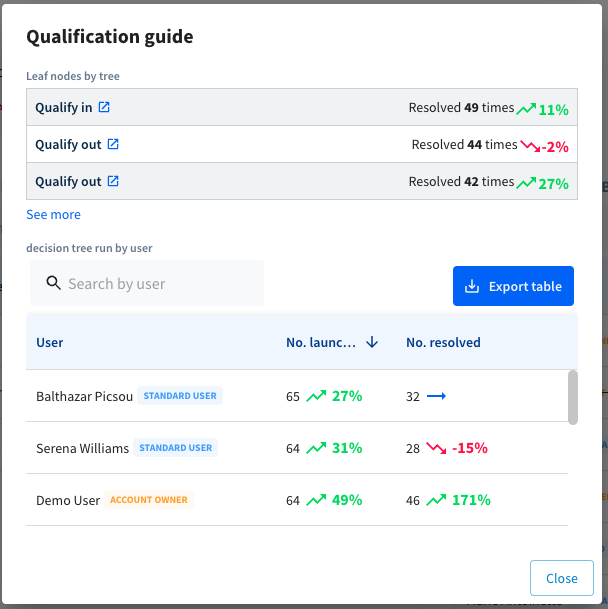
When you click on a row in this table, you will see details of the most frequent results for the selected decision tree, as well as the users who used, launched, and solved it the most, and the percentage change in this data.

<figure><img src="https://160715368-files.gitbook.io/~/files/v0/b/gitbook-x-prod.appspot.com/o/spaces%2FRFCbypPSQCx2ezWjFUPY%2Fuploads%2FBn265Clk1WDbPrs7sEw2%2Fimage.png?alt=media&#x26;token=a4abcb7c-2076-4aca-91ee-17f88ab28c67" alt="" width="456"><figcaption></figcaption></figure>

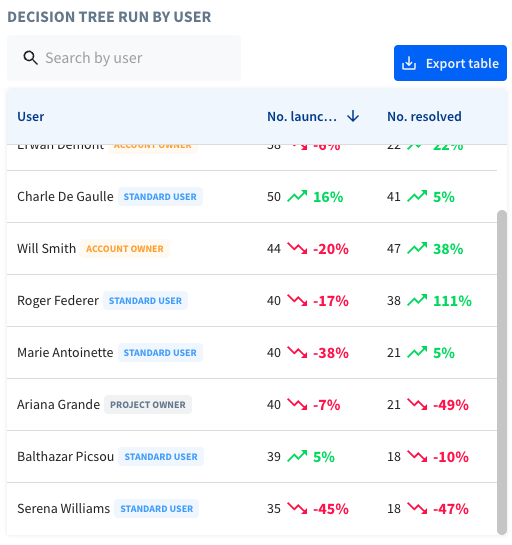
## Statistics per user

<figure><img src="https://160715368-files.gitbook.io/~/files/v0/b/gitbook-x-prod.appspot.com/o/spaces%2FRFCbypPSQCx2ezWjFUPY%2Fuploads%2FP1gHil0L2aM2dr6KUbvg%2Fimage.png?alt=media&#x26;token=4135c058-cd1b-431c-bb46-3ef8f7b68581" alt="" width="384"><figcaption></figcaption></figure>

* User names and associated roles
* Number of decision trees launched, and percentage change
* Number of decision trees solved, and percentage change

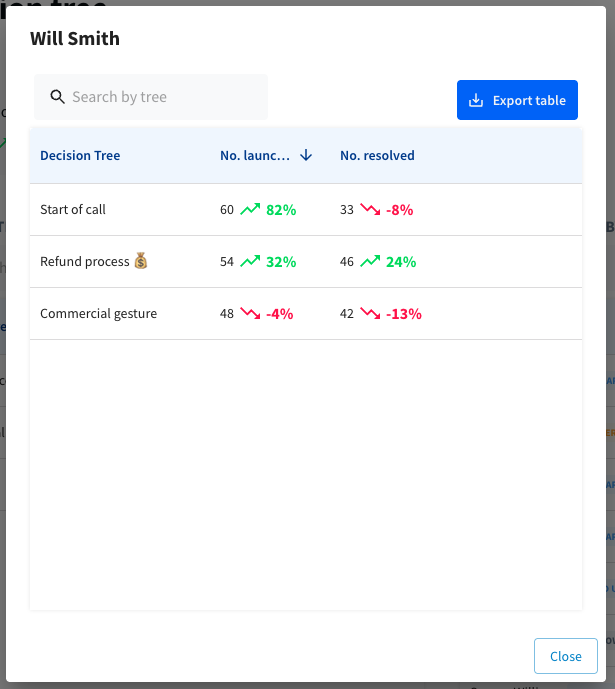
When you click on a row in this table, you will see details for each user of the most used, launched, and solved trees, as well as the percentage change.

<figure><img src="https://160715368-files.gitbook.io/~/files/v0/b/gitbook-x-prod.appspot.com/o/spaces%2FRFCbypPSQCx2ezWjFUPY%2Fuploads%2F5qykbDS0MyaEdBvXrPp2%2Fimage.png?alt=media&#x26;token=e788d793-240f-42d0-966d-a36a1007484b" alt="" width="461"><figcaption></figcaption></figure>